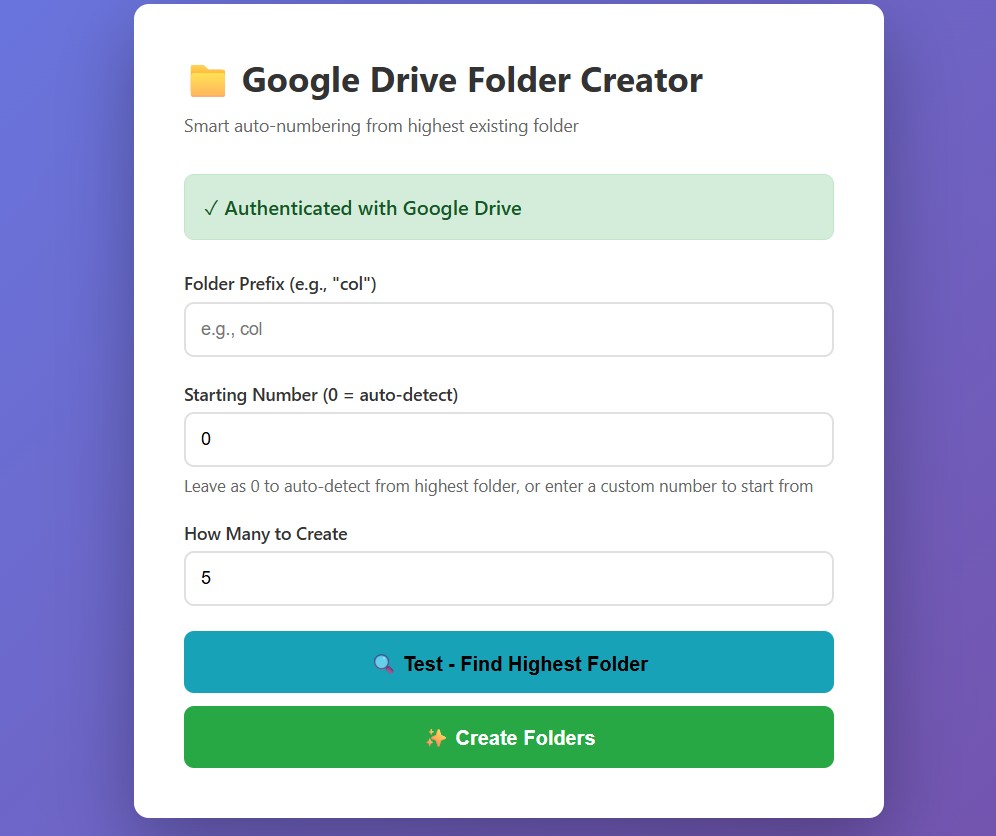
The tool

Prefix, starting number (0 = auto-detect), count. Test first, then create.
The problem
At Army & Outdoors, product images are organised in Google Drive folders named by SKU — one folder per product, holding all that product's photos. Before a product can be photographed and listed, its folder has to exist.
Creating those folders was a manual job. The product team would sit in Google Drive making new folders one at a time: COL2998, COL2999, COL3000... When you're onboarding a batch of new products, that's potentially hundreds of folders, created by hand, one click each, while carefully tracking what number you're up to so you don't duplicate or skip.
It's the definition of low-value repetitive work — necessary, but no one should be spending their day doing it. The product manager asked for a way to make it disappear.
What I built — the Google Drive Folder Creator
A simple internal tool with three inputs:
- Folder prefix — the SKU prefix, e.g.
COLorWEB - Starting number — where to begin. 0 means auto-detect — the tool scans the existing folders for that prefix, finds the highest number, and continues from there. Enter a specific number to override.
- How many to create — the count of sequential folders to generate in one go
How it works in practice
Continuing from yesterday: The team's last folder was COL3000. They want 200 more. They enter prefix COL, leave starting number as 0 (auto-detect), set count to 200. The tool finds COL3000 as the highest existing folder and creates COL3001 through COL3200 — 200 folders, correctly numbered, in one click.
Starting a new prefix at a specific point: They want a WEB series starting after 200. They enter prefix WEB, starting number 200, count 5. The tool creates WEB201, WEB202, WEB203, WEB204, WEB205.
The "Test - Find Highest Folder" button
Before committing, the team can hit Test. It runs the auto-detect and reports what the highest existing folder is and where it would start — without creating anything. So there's a confirmation step before 200 folders get made, not a "hope it's right and find out after" situation.
Security
The tool authenticates with Google Drive via OAuth — proper Google authentication, not a shared key sitting in a config file. It's an internal organisation tool, scoped to the right Drive, and only accessible to the team that needs it.
The result
- Hundreds of folders created in one click instead of one-at-a-time manual creation
- No numbering mistakes — the auto-detect means no accidental duplicates or skipped numbers from someone losing track
- The product team's time goes to product work, not Google Drive admin
- Safe to run — the Test button means the team confirms what will happen before it happens
Why this matters for your store
This isn't a glamorous system. It's a small tool that removes a boring, repetitive task. But that's exactly the kind of thing that quietly drains a team — the work that's beneath everyone's skill level but still has to be done, every day, by someone.
Most "automation projects" aim at the big, impressive workflows. The higher-ROI move is often the opposite: find the small, dumb, repetitive task that a person is doing 200 times a week and make it a single click. The folder creator took very little time to build and gave the product team hours back. There's usually one of these hiding in every operations team — the question is just whether anyone's bothered to look.